
Python Scripts für Raspberry Pico H
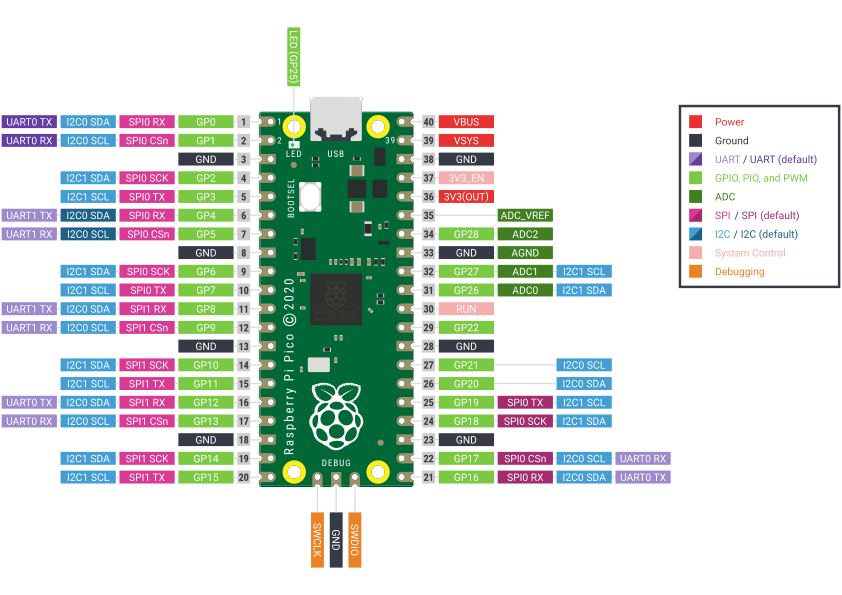
1 Dezember / On Board LED
from machine import Pin
onboardLED = Pin(25, Pin.OUT)
onboardLED.value(1)
2. Dezember / LED's
from machine import Pin
import time
gruen = Pin(18, Pin.OUT)
gelb = Pin(19, Pin.OUT)
rot = Pin(20, Pin.OUT)

# Anzahl der Iterationen für die Schleife
anzahl = 20

# Schleife mit Verzögerung von 5 Sekunden
for i in range(anzahl):
    print(f"Schleifeniteration {i + 1}")
    rot.value(1)
    time.sleep(3)
    rot.value(0)
    gelb.value(1)
    time.sleep(3)
    gelb.value(0)
    gruen.value(1)
    time.sleep(5)
    rot.value(0)
    gelb.value(0)
    gruen.value(0)
    time.sleep(5)
3. Dezember / 3 Taster
from machine import Pin
import time

knopf1 = Pin(13, Pin.IN, Pin.PULL_DOWN)
knopf2 = Pin(8, Pin.IN, Pin.PULL_DOWN)
knopf3 = Pin(3, Pin.IN, Pin.PULL_DOWN)
rot = Pin(20, Pin.OUT)
gelb = Pin(19, Pin.OUT)
gruen = Pin(18, Pin.OUT)
rot.value(0)
gelb.value(0)
gruen.value(0)

while True:
    time.sleep(0.2)

    if knopf1.value() == 1:
        print("Knopf 1 gedrückt")
        rot.toggle()
    if knopf2.value() == 1:
        print("Knpf 2 gedrückt")
        gelb.toggle()
    if knopf3.value() == 1:
        gruen.toggle()
4. Dezember / Potentiometer / LED Helligkeitssteuerung mit PWM
from machine import ADC, Pin, PWM
import time

# Anschluss Poti an GP27 und an Plus 3.3 Volt und Minus
poti = ADC(Pin(27))

# LED
gruen = PWM(Pin(18))
gelb = PWM(Pin(19))
rot = PWM(Pin(20))

# Variable mdelay = 0
gruen.freq(1000)
gelb.freq(1000)
rot.freq(1000)

reading = 0

while True:

    reading = poti.read_u16()
    print(reading)
    gruen.duty_u16(reading)
    gelb.duty_u16(reading)
    rot.duty_u16(reading)
    time.sleep(0.001)
5. Dezember / Buzzer
 Imports
from machine import Pin, PWM
import time

# Set up the Buzzer pin as PWM
buzzer = PWM(Pin(13)) # Set the buzzer to PWM mode

# Create our library of tone variables for "Jingle Bells"
C = 523
D = 587
E = 659
G = 784

# Create volume variable (Duty cycle)
volume = 30000

# Play the tune

# "Jin..."
buzzer.duty_u16(volume) # Volume up
buzzer.freq(E) # Set frequency to the E note
time.sleep(0.1) # Delay
buzzer.duty_u16(0) # Volume off
time.sleep(0.2) # Delay

# "...gle"
buzzer.duty_u16(volume)
buzzer.freq(E)
time.sleep(0.1)
buzzer.duty_u16(0)
time.sleep(0.2)

# "Bells"
buzzer.duty_u16(volume)
buzzer.freq(E)
time.sleep(0.1)
buzzer.duty_u16(0)
time.sleep(0.5) # longer delay

# "Jin..."
buzzer.duty_u16(volume)
buzzer.freq(E)
time.sleep(0.1)
buzzer.duty_u16(0)
time.sleep(0.2)

# "...gle"
buzzer.duty_u16(volume)
buzzer.freq(E)
time.sleep(0.1)
buzzer.duty_u16(0)
time.sleep(0.2)

# "Bells"
buzzer.duty_u16(volume)
buzzer.freq(E)
time.sleep(0.1)
buzzer.duty_u16(0)
time.sleep(0.5) # longer delay

# "Jin..."
buzzer.duty_u16(volume)
buzzer.freq(E)
time.sleep(0.1)
buzzer.duty_u16(0)
time.sleep(0.2)

# "...gle"
buzzer.duty_u16(volume)
buzzer.freq(G)
time.sleep(0.1)
buzzer.duty_u16(0)
time.sleep(0.2)

# "All"
buzzer.duty_u16(volume)
buzzer.freq(C)
time.sleep(0.1)
buzzer.duty_u16(0)
time.sleep(0.2)

# "The"
buzzer.duty_u16(volume)
buzzer.freq(D)
time.sleep(0.1)
buzzer.duty_u16(0)
time.sleep(0.2)

# "Way"
buzzer.duty_u16(volume)
buzzer.freq(E)
time.sleep(0.1)
buzzer.duty_u16(0)
time.sleep(0.2)

# Duty to 0 to turn the buzzer off
buzzer.duty_u16(0)
6. Dezember / Helligkeitssensor
# Imports
from machine import ADC, Pin
import time

# Set up the LED pins
red = Pin(18, Pin.OUT)
amber = Pin(19, Pin.OUT)
green = Pin(20, Pin.OUT)

# Define pin for our sensor
lightsensor = ADC(Pin(26))

while True: # Run forever

    # Read sensor value and store it in a variable called 'light'
    light = lightsensor.read_u16()

    # Use the round function to limit the decimal places to 1
    lightpercent = round(light/65535*100,1)

    # Print our reading percentage with % symbol
    print(str(lightpercent) +"%")

    # 1 second delay between readings
    time.sleep(1)

    if lightpercent <= 30: # If percentage is less than or equal to 30

        red.value(1) # Red LED on
        amber.value(0)
        green.value(0)

    elif 30 < lightpercent < 60: # If percentage is between 30 and 60

        red.value(0)
        amber.value(1) # Amber LED on
        green.value(0)

    elif lightpercent >= 60: # If percentage is greater than or equal to 60

        red.value(0)
        amber.value(0)
        green.value(1) # Green LED on
7. Dezember / Bewegungssensor
# Imports
from machine import Pin, PWM
import time

# Set up the LED pins
red = Pin(18, Pin.OUT)
amber = Pin(19, Pin.OUT)
green = Pin(20, Pin.OUT)

# Set up the Buzzer pin as PWM
buzzer = PWM(Pin(13))

# Set PWM duty to 0% at program start
buzzer.duty_u16(0)

# Set up PIR pin with pull down
pir = Pin(26, Pin.IN, Pin.PULL_DOWN)

# Warm up/settle PIR sensor
print("Warming up...")
time.sleep(10) # Delay to allow the sensor to settle
print("Sensor ready!")

def alarm(): # Our alarm function

    # Set PWM duty (volume up)
    buzzer.duty_u16(500)

    for i in range(5): # Run this 5 times

        buzzer.freq(1000) # Higher pitch

        red.value(1) # Red ON
        amber.value(1) # Amber ON
        green.value(1) # Green ON

        time.sleep(1)

        buzzer.freq(500) # Lower pitch

        red.value(0) # Red OFF
        amber.value(0) # Amber OFF
        green.value(0) # Green OFF

        time.sleep(1)

    # Set PWM duty (volume off)
    buzzer.duty_u16(0)

while True: # Run forever

    time.sleep(0.01) # Delay to stop unnecessary program speed

    if pir.value() == 1: # If PIR detects movement

        print("Bewegung erkannt!")

        alarm() # Call our function

        print("Sensor aktiv") # Let us know that the sensor is active again